🖥️
Runs on Your Machine
Projects, conversations, experiments, logs, and artifacts stay on your computer. PG Lab AI has no server of its own and collects no usage analytics.

§ PG Lab AI · Available Now
Launch research agents that review literature, develop hypotheses, run experiments, and produce research artifacts - on your own machine, with your own models.
Free and open source. All releases · Source on GitHub
6
Literature Sources
5
Coding Agents
8
Compute Backends
Works with the sources, agents, and compute you already use
§ Features
From the first literature search to the final figure, in one desktop app.
Projects, conversations, experiments, logs, and artifacts stay on your computer. PG Lab AI has no server of its own and collects no usage analytics.
When Ollama is serving the lab's Qwen model, PG Lab AI connects it automatically and uses it for new chats - no cloud account required.
Agents search PubMed, Europe PMC, ClinicalTrials.gov, bioRxiv, OpenAlex, and alphaXiv to ground hypotheses in published and registered evidence.
Every experiment is a branch in a local experiment tree with its code, logs, and results recorded, so agents learn from past runs.
Run on this machine, a lab GPU workstation over SSH, a Slurm cluster, Kubernetes, Ray, Modal, Hugging Face Jobs, or Tinker.
Works with OpenCode, Claude Code, Codex, Cursor, and Google Antigravity - switch agents per chat without changing your projects.
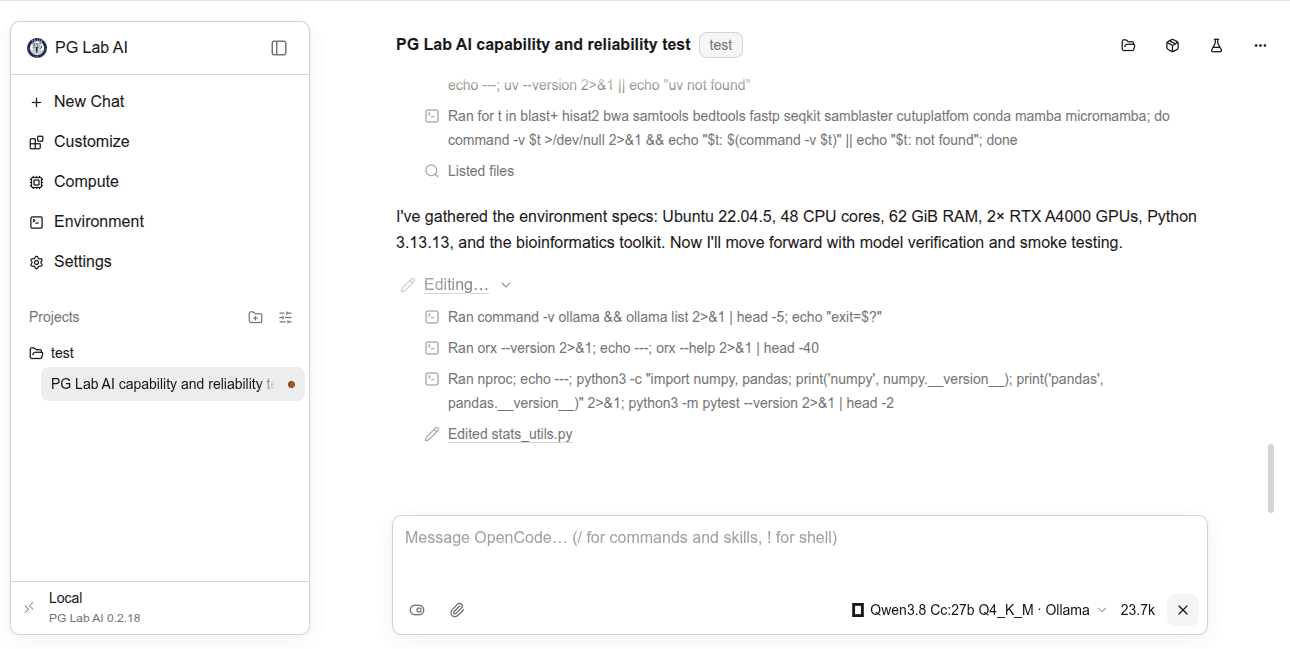
Here an agent checks the lab environment - CPUs, GPUs, Python, and bioinformatics tools - before verifying a model and running smoke tests, all on a local model.
§ Workflow
The research loop PG Lab AI agents follow.
Describe a research question or analysis in plain language.
The agent searches the literature and trial registries for evidence.
It writes code and runs experiments on your chosen compute.
Results, logs, and figures are recorded and compared across runs.
Produce figures, summaries, and LaTeX papers from the evidence.
§ FAQ
PG Lab AI is a desktop workspace where AI research agents review literature, develop hypotheses, run experiments, and produce research artifacts. It is built by the PG Lab for pediatric surgery, genomics, and AI research.
Yes. PG Lab AI is free and open source under the MIT License. It is based on OpenResearch by alphaXiv.
PG Lab AI itself stores everything locally and collects no analytics. Only the services you choose to use receive data: the model provider behind your coding agent, and the literature sources you search. With a local Ollama model, the agent runs entirely on your machine.
PubMed, Europe PMC (including open full text and preprints), ClinicalTrials.gov, bioRxiv, OpenAlex, and alphaXiv. You can turn any source off in Settings.
If Ollama is serving qwen3.8-cc:27b-q4_K_M, PG Lab AI uses it for new chats by default. You can choose another Ollama, LM Studio, or oMLX model, or any OpenAI-compatible server.
The installers are not yet code-signed. On macOS, right-click PG Lab AI in Applications and choose Open. On Windows, choose More info, then Run anyway, on the SmartScreen prompt.
Yes. Add the workstation as an SSH host and select it as a compute target; experiments then run on its GPUs while you work from your laptop.
Download PG Lab AI, open a project, and ask your first research question. Free, open source, and local-first.